- Docs
- Variables
- Fields
Variables
Fields
Fields ask you for details when you insert a snippet, so one snippet works for every customer and every case.
{{name}} Free#
A text box in the fill-in window: {{name:Label}}. Use the label again anywhere in the snippet to repeat the answer. Without a label it is called “Name”.
Hi {{name:Customer}},
thanks for choosing us, {{name:Customer}}!
You fill in
- Customer
- Sam
Result
Hi Sam,
thanks for choosing us, Sam!
Defaults Free#
Add a default after a bar: {{name:Label|default}}. The box starts with it, and you can change it before inserting.
Keeping the default Free
Hi {{name:Customer|there}}!You fill in
- Customer
- there
Result
Hi there!{{pick}} Free#
A drop-down list: {{pick:Label|first|second|third}}. The first option is selected to start. Every option needs some text.
{{pick:Greeting|Hello|Hi|Hey}} {{name:Customer}}!You fill in
- Greeting
- Hi
- Customer
- Sam
Result
Hi Sam!If you use the same label twice, use the same options both times, or give the second one a different label.
{{multipick}} Pro#
Checkboxes for choosing any number of options: {{multipick:Label|a|b|c}}. Ticked options are inserted in the order you wrote them, separated by a comma and a space. Nothing is ticked to start, and leaving all unticked inserts nothing.
Extras: {{multipick:Extras|Fries|Drink|Dessert}}You fill in
- Extras
- Fries, Dessert
Result
Extras: Fries, Dessert{{text}} Pro#
A larger box for answers with several lines: {{text:Label}} or {{text:Label|default}}.
Summary:
{{text:Notes|n/a}}
You fill in
- Notes
- Two seats on the Team plan. Starts next month.
Result
Summary:
Two seats on the Team plan.
Starts next month.
{{toggle}} Pro#
A checkbox that includes or leaves out a piece of text: {{toggle:Label|text to include}}. It starts ticked. The text can span several lines.
Ticked Pro
Thanks for your time.{{toggle:Signature|
Best regards,
Alex}}
You fill in
- Signature
- Best regards, Alex
Result
Thanks for your time.
Best regards,
Alex
Unticked Pro
Thanks for your time.{{toggle:Signature|
Best regards,
Alex}}
You fill in
- Signature
- left empty
Result
Thanks for your time.Putting fields together#
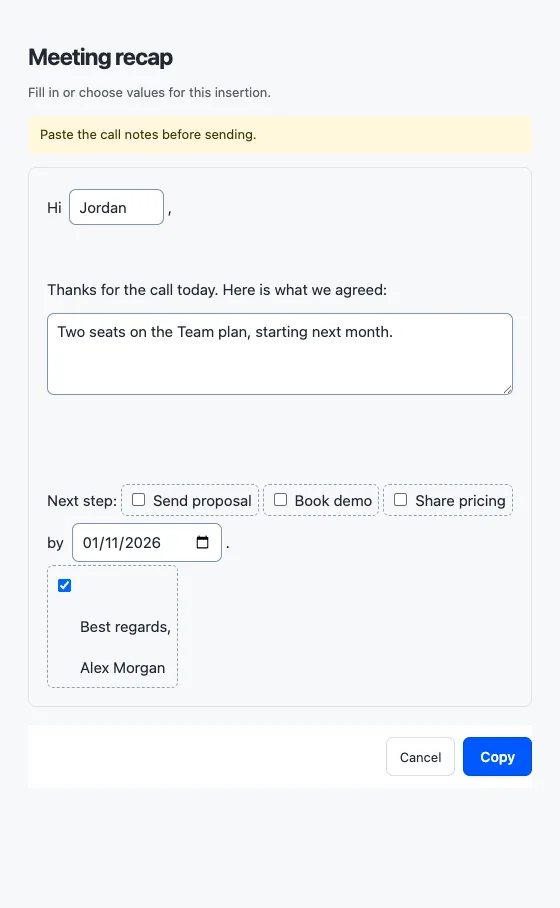
A meeting recap Pro
{{note:Paste the call notes before sending.}}Hi {{name:Client}},

Here is what we agreed:
{{text:Summary}}

Next step: {{multipick:Next step|Send proposal|Book demo|Share pricing}} by {{datefield:Due date|DD/MM/YYYY}}.{{toggle:Signature|
Best regards,
Alex}}
You fill in
- Client
- Jordan
- Summary
- Two seats on the Team plan.
- Next step
- Send proposal, Book demo
- Due date
- 2026-09-15
- Signature
- Best regards, Alex
Result
Hi Jordan,

Here is what we agreed:
Two seats on the Team plan.

Next step: Send proposal, Book demo by 15/09/2026.
Best regards,
Alex