
- Docs
- Getting started
- Shortcuts and expansion
Getting started
Shortcuts and expansion
How expansion works, which keys open the picker, and how to pause or limit LazyBoard.
On this page
How expansion works#
When you finish typing an abbreviation in a supported text field, LazyBoard removes it and inserts the snippet. If the snippet has fields, a fill-in window opens first. When it contains {{cursor}}, the cursor is placed there afterwards.
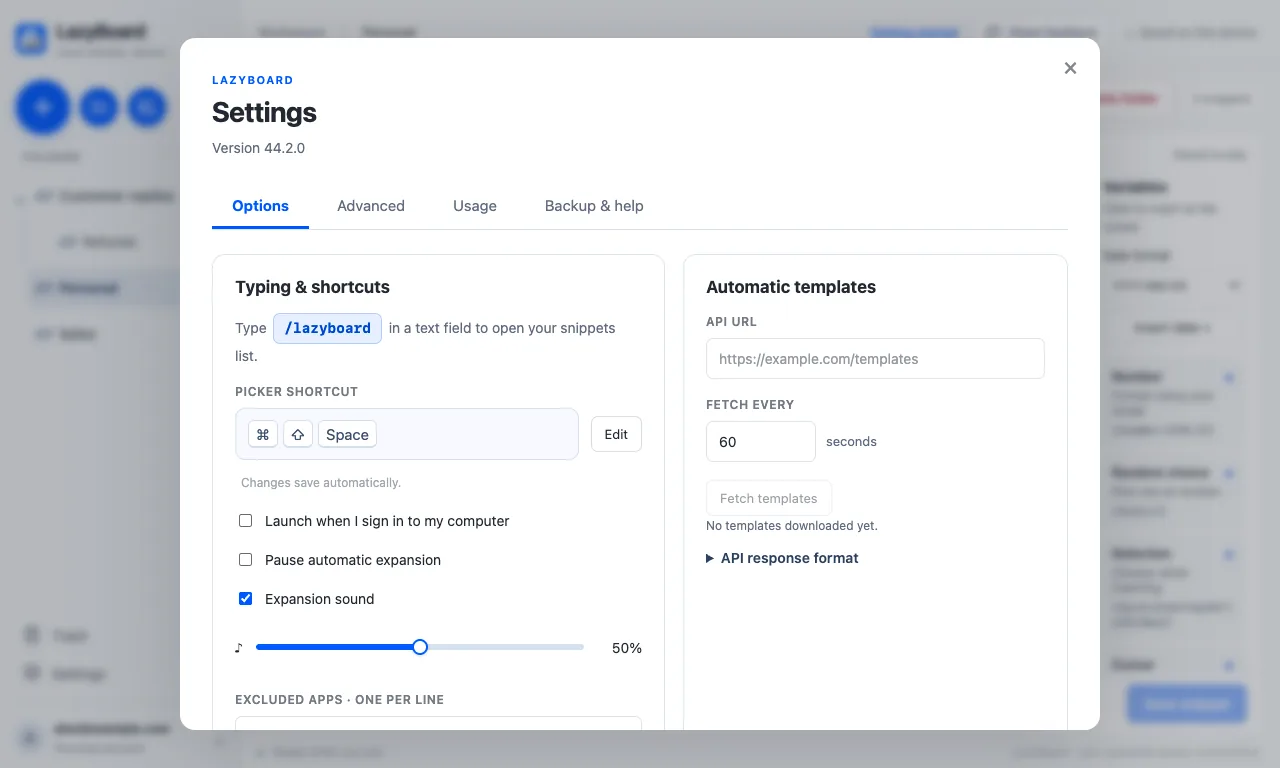
An expansion sound plays when a snippet is inserted. Change its volume or turn it off in Settings → Options.
Keyboard shortcuts#
| Action | Mac | Windows | Chrome extension |
|---|---|---|---|
| Open the snippet picker | ⌘ShiftSpace | CtrlShiftSpace | AltShiftL |
| Open the picker by typing | /lazyboard | /lazyboard | — |
| Move through results | ↑ ↓ | ↑ ↓ | ↑ ↓ |
| Insert the selected snippet | Return | Enter | Enter |
| Close the picker | Esc | Esc | Esc |
| Reorder a folder | Alt↑ Alt↓ | Alt↑ Alt↓ | Alt↑ Alt↓ |
To change the picker shortcut, open Settings → Options → Picker shortcut, click Edit and press a new combination. It must include ⌘, Ctrl or Alt with another key. In Chrome, change the extension shortcut at chrome://extensions/shortcuts.
Pause expansion#
Turn on Pause automatic expansion in Settings → Options, or use Expand Snippets in the menu bar panel, to stop shortcuts from expanding for a while. The picker still works. The status at the bottom of the window reads Expansion paused.
Exclude apps and websites#
Under Excluded apps in Settings, add one app per line where LazyBoard should never expand shortcuts, such as a code editor or a game. In the Chrome extension, Excluded websites takes one hostname per line; a hostname also excludes its subdomains.
Desktop app and extension together#
If you use the desktop app and the Chrome extension on the same computer, only one of them should expand in the browser. Settings → Advanced → Desktop expansion in browsers decides:
- Automatic · prefer the extension (recommended): the desktop app steps aside while a connected LazyBoard extension handles Chrome, Edge and Brave.
- Never use desktop expansion: the desktop app never expands in those browsers.
- Always use desktop expansion: the desktop app handles browsers and the extension steps aside. Switching can take up to 15 seconds.